Hardware Overview#
Version 1.4 Pinout#
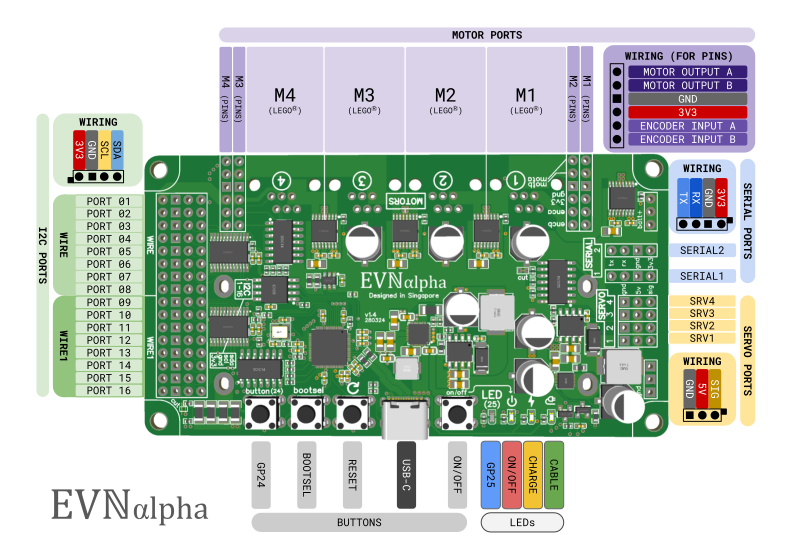
Front Side:
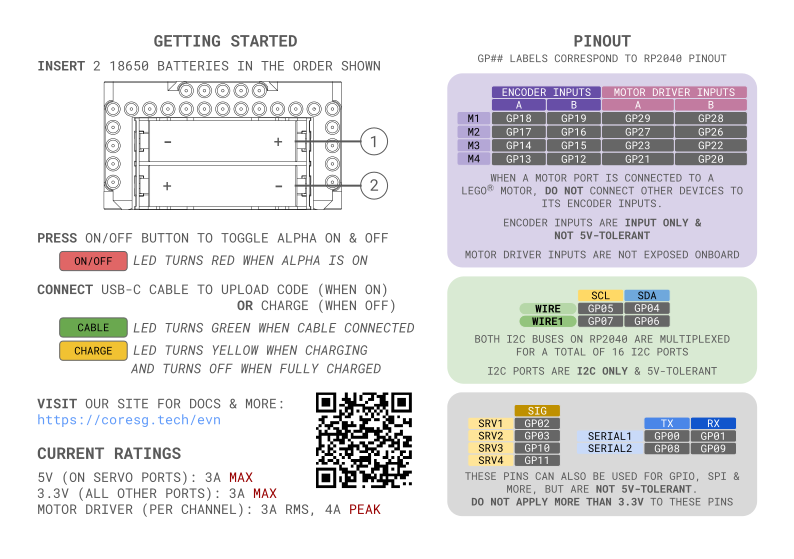
Back Side:
Warning
For pre-production versions of EVN Alpha (V1.3 & below, unless stated otherwise), there are changes to board layout:
Servo ports have their pin order flipped, such that the ground pin is closer to the edge of the board. This means all pre-production versions do not work with our Servo Standard Peripherals due to their connectors, but will work with regular hobby servos.
V1.4 |
<=V1.3 |
|---|---|
GND, 5V, SIG (edge of board) |
SIG, 5V, GND (edge of board) |
Servo port numbers (1-4) are not printed onboard, but the GPIO pins are. The GPIO pins 2, 3, 10 and 11 are mapped to servo ports 1, 2, 3 and 4 respectively (e.g. Port labelled GPIO pin 2 is Servo Port 1).
On V1.2 and V1.1 boards, Serial ports have their pin order changed as shown below:
V1.4, 1.3 |
<=V1.2 |
|---|---|
TX, RX, GND, 3V3 (edge of board) |
3V3, GND, RX, TX (edge of board) |
Serial ports 1 and 2 are labelled as UART ports 0 and 1 respectively
The position of Servo/Serial ports vary with each board version, but can be identified using the printed labels onboard and the points above
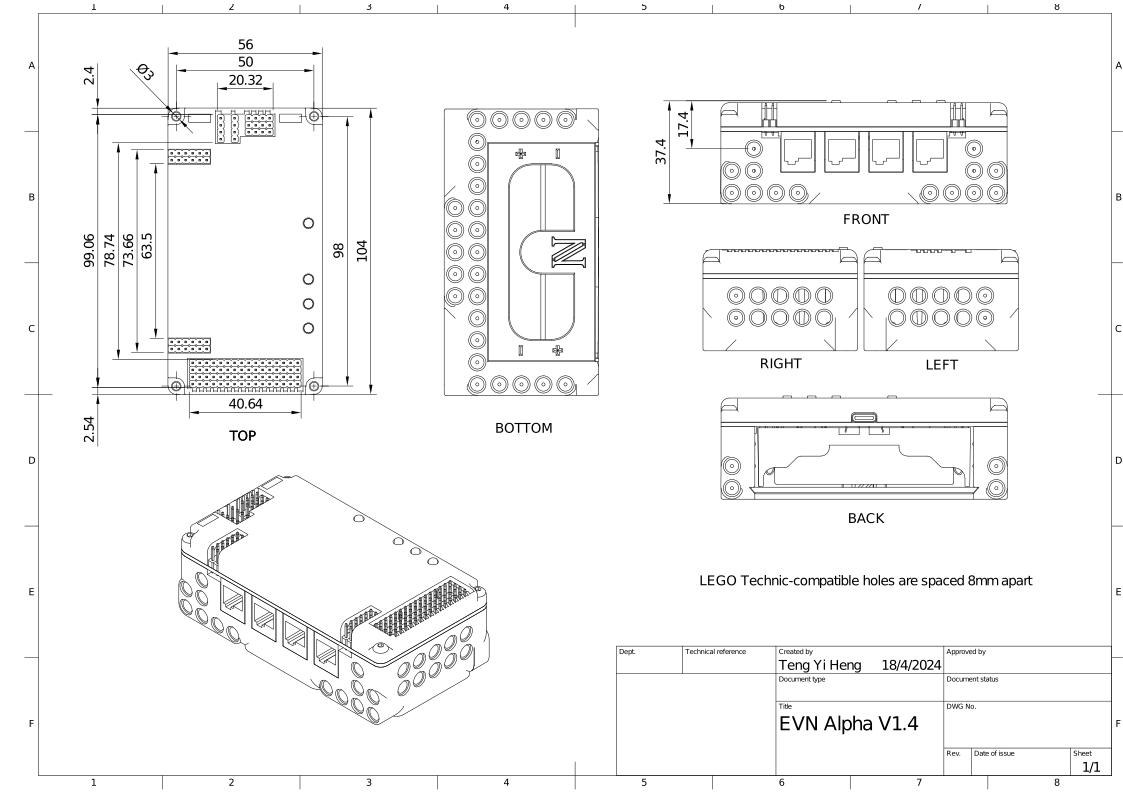
Dimensions#
Hardware Details#
Motor Drivers#
EVN Alpha uses 8 of the RP2040’s pins as motor driver inputs to control the 4 DRV8833 motor drivers onboard. These pins are not directly exposed, but the pin numbers are listed if you’d like to control the drivers directly.
But the motor driver outputs are directly exposed in 2 connector styles: 2.54mm headers and the NXT/EV3 motor port. As long as the total stall current does not exceed 3A, 2 motors can be wired to the same motor port using both connectors.
Another 8 pins are used for the encoder inputs for each motor. Encoders cannot be wired in parallel, so do not use the encoder pins on both connectors at the same time. Since these pins pass their signals into a Schmitt-trigger inverter to clean up the signal, they are input-only pins. Setting the pins to output will not damage the board, but will not work as intended.
The encoder pins can also be used as Software Serial TX (input) pins, although this has not been tested.
I2C#
The I2C pins on the RP2040 are not directly exposed. Instead, to achieve a total of 16 individually addressable I2C ports, an 8-channel TCA9548A I2C Multiplexer (I2C address 0x70) on each of the RP2040’s 2 I2C buses, and each channel is exposed as an I2C “port”. Hence, the I2C ports are not GPIO-capable, but they are 5V-tolerant.
The multiplexers are connected to pins GP4,5,6,7, and do not support I2C clock speeds higher than 400kHz.
They can be controlled using I2C commands with Wire and Wire1, or the interface provided by the EVNAlpha class (recommended).
If you need to run I2C at higher speeds, consider initializing the I2C buses on the alternate I2C pins instead (shown below). Just keep in mind that if an I2C bus is running on non-default pins, the onboard multiplexer for that bus and the 8 I2C ports it provides will not be available for use.
Port |
I2C0 |
I2C1 |
|---|---|---|
SDA |
GP00/GP08 |
GP02/GP10 |
SCL |
GP01/GP09 |
GP03/GP11 |
Example for changing I2C0 bus to the alternate pins:
#include <EVN.h>
#include <Wire.h>

EVNAlpha board;

void setup()
{
    board.begin(); //this function starts the I2C bus on the default pins
    Wire.end(); //stop I2C0 bus from running
    Wire.setSDA(0); //set SDA pin to non-default pin
    Wire.setSCL(1); //set SCL pin to non-default pin
    Wire.begin(1000000); //start I2C0 bus at 1Mhz
}
GPIO#
The pins from the Serial and Servo ports can all be used as General Purpose Input/Output (GPIO) pins, so any digital input or output modes can be enabled.
However, they are not 5V-tolerant, so they should not be connected to any devices which will apply more than 3.3V to the pin.
SPI#
The pins from the Serial and Servo ports can be repurposed for 2 hardware SPI connections for much faster transmission speeds.
Port |
SPI0 |
SPI1 |
|---|---|---|
CS |
GP01 |
GP09 |
SCK |
GP02 |
GP10 |
SDI |
GP00 |
GP08 |
SDO |
GP03 |
GP11 |
Software Serial#
The pins from the Servo Ports can be repurposed for 2 bi-directional or 4 uni-directional PIO-emulated Serial UART. It’s not a hardware UART, but using PIO to emulate the ports means CPU overhead is minimized.
For information on programming these ports, look at this page on the Arduino-Pico docs.
Battery Voltage Pins#
On each side of the serial and servo ports, there are 3 pins for unregulated battery voltage (6.3-8.4V) and ground respectively. Feel free to solder headers or wires to them for powering more devices. Remember not to exceed the current rating of your batteries!
Charging Chip#
For charging, we use TI’s BQ25887 battery charge management IC, which charges the battery at 1.5A current.
This chip (I2C address 0x6A) is connected to I2C port 16, to provide battery voltage information.
If you need to remove this I2C connection, cut the 2 exposed traces left of the user button, labelled cut.
If you wish to enable charging while in on mode, cut the exposed trace right of the EVN logo, labelled cut.
Keep in mind that you will have to ensure your USB port can supply 5V 3A during upload, and motors may behave slightly differently when the batteries are charging.
Battery Voltage Cutoff#
When the battery voltage dips below 6.2V, On Mode is disabled. Pressing the On/Off button will do nothing until the battery is charged above 6.3V.
As lithium-ion batteries get nearer to depletion, high current loads such as motors can cause their voltages to drop suddenly.
For instance, the batteries may be 6.4V at idle, but dip below 6.2V when the motors start running, causing the board to turn off.
After the board (and motors) are turned off, the battery voltage may rise back to 6.4V, allowing the board to be turned on again.
Nevertheless, it’s strongly recommended to charge the board when the voltage cutoff occurs.
Battery voltage measurements and low battery alerts can be configured in the EVNAlpha class.
Flash#
EVN Alpha uses a W25Q128JVSIQ 16MB SPI flash chip for program storage and read-only memory, which is the maximum size supported by the RP2040.
Since this is much larger than most compiled programs will use, you can use part of the flash memory as an onboard filesystem.
Disassembly#
The PCB can be separated from the top and bottom shells by unscrewing the 4 M3 bolts at each corner with a 2.0mm hex screwdriver.
RP2040 Hardware Utilised by EVN Libraries#
PWM#
The RP2040 has 16 PWM channels (split into 8 pairs called “slices” by Raspberry Pi). These channels have many functions, but the most common is to generate PWM outputs using analogWrite().
However, these channels are split between the RP2040’s 30 pins, and some are used to control the onboard motor drivers.
The EVNMotor library uses slices PWM2, PWM3, PWM5 and PWM6 for motor ports 1-4 respectively.
Pins 10-11 are also connected to PWM6, so they cannot be used for analogWrite() if motor port 4 is simultaneously active.
However, the remaining output-capable pins (GP0-3 and 8-9) are connected to other PWM slices, so they can be used without clashing.
Timers#
The EVNAlpha, EVNMotor and EVNServo libraries use hardware timers 1 and 2 to automatically update control loops for the motors and servos, without any end-user code.
This leaves hardware timers 0 and 3 completely free for the end user. Users may also be able to share timers 1 and 2 with our libraries, as they are not fully utilised.
PIO#
Each EVNServo, EVNContinuousServo or EVNRGBLED object consumes one of the RP2040’s 8 Programmable IO (PIO) state machines.
ADC (Analog Pins)#
The RP2040 has 4 pins with built-in ADC support (GP26-29), but these functions are not supported on EVN Alpha, as those 4 pins are internally connected to the motor drivers and cannot be repurposed. However, analog values can still be measured using our 4-Channel ADC Standard Peripheral.
Second Core#
At present, the following classes use the second core and are tested under the assumption that nothing else is running on the second core:
EVNMotorEVNDrivebaseEVNServoEVNContinuousServo
You may be able to use the second core, but perfect operation of these classes will not be guaranteed (although we hope to achieve this one day).
Hardware Spinlocks#
Spinlocks are a hardware mechanism used to communicate and protect memory access between cores.
On the RP2040, these are particularly valuable for multicore communication as it does not support atomic operations on variables (another common mechanism for core synchronization).
The RP2040 has 32 spinlocks, 16 of which are reserved for the user.
8 of these spinlocks are a striped range which can be shared by multiple classes, suitable for implementing memory barriers between the 2 cores.
The other 8 are available for exclusive non-shared use by classes/end-user code. For the EVN libraries, we use these to do basic scheduling of certain tasks between the cores.
The following classes use some of these 16 spinlocks:
EVNMotorandEVNDrivebase(shared): 1 striped, 1 exclusiveEVNServoandEVNContinuousServo(shared): 1 striped, 1 exclusiveEVNRGBLED: 1 stripedEVNAlpha: 1 striped, 2 exclusive
Spinlocks are shared across all instances of the given classes.
Direct Memory Access (DMA)#
The RP2040 has 12 DMA channels, which can be used to offload memory-transfer related tasks from the main cores.
DMA channels also have the ability to generate interrupts (DMA_IRQ_0 or DMA_IRQ_1).
All instances of EVNRGBLED share one of the RP2040’s 12 DMA channels and take full control of the DMA_IRQ_0 interrupt.
More information#
For more information, refer to the RP2040 Datasheet.